Key Takeaways
- DNS poisoning manipulates DNS responses to redirect users to malicious websites, enabling credential theft, malware installation and widespread network compromise through poisoned DNS caches.
- DNS poisoning can result in data theft, malware infections, financial losses, operational disruption and reputational damage, making DNS security essential for protecting users and organizations.
- The best defense against DNS poisoning combines DNSSEC, encrypted DNS traffic, continuous monitoring, private DNS infrastructure and certificate-based authentication to prevent attacks and reduce risk.
A user ends up on a malicious website even after entering the correct website address into the browser. They may not even realize the website is fake until their credentials are compromised or malware has been installed.
This is the danger of DNS poisoning. By manipulating DNS responses or corrupting DNS caches attackers can redirect legitimate requests to malicious destinations and capture sensitive information.
This article explains how DNS poisoning works, outlines common attack methods and illustrates the impact of this cyberattack on organizations. We’ll also offer insight into effective strategies for preventing these attacks to keep networks safe and secure.
What Is DNS Poisoning?
Domain Name System (DNS) poisoning is a type of cyberattack that targets DNS vulnerabilities. Under this type of attack, a hacker manipulates the DNS server or DNS cache, injecting it with fraudulent address resolutions.
As a result, when a user makes a DNS request for a specific website, the DNS resolver unknowingly redirects the request to a completely different IP address, often a malicious website set up by the hacker.
The unsuspecting user, thinking they’re logging into a legitimate website, may provide personal information or login credentials, falling prey to data theft or malware installation.
A 2025 DNS Security Study from Forrester Consulting, commissioned by EfficientIP, found that 95% of organizations experienced DNS-related cyberattacks or vulnerabilities over a period of a year. 25% of attacks involved DNS cache poisoning while the average cost per DNS-related attack was $1.1 million.
DNS poisoning is often used as an umbrella term for attacks that manipulate DNS responses. DNS cache poisoning is the most common form, while DNS spoofing refers to forging DNS responses to redirect users or poison caches.
All types of DNS poisoning attacks have the potential to disrupt operations and compromise data at both individual and organizational levels.
See your security gap before attackers do.
See continuous trust in action on a platform that includes RADIUS, PKI and AI security.
What Is DNS and How Does It Work?
The Domain Name System serves as the Internet’s phone book. While we interact with the Internet using human-friendly domain names such as (www.example.com), behind the scenes, these names are converted into machine-friendly IP addresses.
This is achieved through a DNS lookup process where a DNS server, functioning like an automated directory assistance service, interprets the domain names into their corresponding IP addresses by going between four different types of servers:
- DNS resolvers: When a web client sends a DNS query, the DNS resolver (also known as a recursive resolver) either delivers cached data or sends the request to the remaining servers in order to deliver the IP address.
- Root nameservers: After receiving a request from a DNS resolver, the root nameserver interprets the domain’s extension and directs the request to the appropriate top-level domain (TLD) nameserver.
- TLD nameservers: In response to requests from root nameservers, TLD nameservers locate the specific domain, then send a request to that domain’s authoritative name server. There are unique TLD nameservers for every domain extension: .com, .org, .gov and so on.
- Authoritative nameservers: The authoritative nameserver holds IP information for individual domain names; after receiving a request from a TLD nameserver, the DNS resolver receives the associated IP address from the authoritative nameserver.
Humans remember names, but networks communicate using IP addresses.
Since nearly all modern networks use this process to access DNS records, following DNS security best practices is essential to protect against attacks.
How Do DNS Poisoning Attacks Work?
At a high level, every DNS poisoning attack follows the same four-step process:
- A user requests a website. Their DNS resolver looks up the website’s IP address.
- An attacker sends a forged DNS response. If it arrives before the legitimate response, the resolver accepts the fake IP address.
- The resolver caches the false record. Future requests use the poisoned DNS entry instead of querying the legitimate server.
- Users are redirected to malicious websites. Anyone relying on the poisoned cache may be sent to fake sites until the cache expires or is cleared.
Here’s exactly how each step works:
Step 1: User Attempts to Visit a Website; DNS Resolver Requests IP
To visit a specific website, a user requests the IP address by entering the domain name into their browser, say, samplesite.com.
When the browser hasn’t visited that website before, it requests the IP address for samplesite.com by reaching out to a DNS resolver. That DNS resolver expects to receive a legitimate IP address from the authoritative name server.
Step 2: Attacker Intercepts DNS Request, Redirecting the User
Here lies the crux of DNS poisoning attacks, where attackers must respond to DNS requests faster than the authoritative server.
Attackers intercept DNS requests by immediately flooding the resolver with false responses before the reply from the authoritative nameserver arrives. In these replies, they substitute authentic IP addresses with false ones.
For example, if the real IP address for samplesite.com were 192.0.2.37, the attacker might deliver a fake IP address of 192.0.2.36 instead.
Because the User Datagram Protocol (UDP) doesn’t verify DNS data integrity, DNS resolvers believe these responses come from the authoritative nameserver and accept the false IP addresses as legitimate, redirecting users to malicious sites.
Satisfied with the response, the DNS server caches that false IP address and sends it straight to the user.
While the user’s intended destination was samplesite.com at IP address 192.0.2.37, the DNS server sends them to a spoofed site with the IP address 192.0.2.36 instead.
Danger: That fake website might look identical to samplesite.com, tricking the user into browsing, clicking links and entering sensitive information, all of which the attacker can intercept.
Step 3: False IP Address Poisons the DNS Cache
Once the server accepts the fake website and IP, it caches the illegitimate IP address for future use. That’s how attackers poison DNS caches.
When the user attempts to visit that website again, the DNS resolver looks up the poisoned DNS cache and retrieves the same wrong IP address from the initial visit — thus perpetuating the attack.
But it doesn’t end there.
When organizations used shared caches, these attacks don’t just affect a single DNS server. By caching the same false IP addresses across devices, these poisoning attacks can impact the entire company.
Step 4: Poisoned Cache Spreads to Other DNS Servers
Since DNS caches regularly share information with other DNS servers to keep their data updated, a poisoned DNS cache can spread its corrupted data to other caches.
This propagation of false DNS information across multiple domain name servers amplifies the impact of the attack, leading to a more widespread compromise of user data and network security.
In this way, a single successful DNS poisoning attack can impact multiple users who all share the same DNS cache.
Warning: Every cache entry has a specific time to live (TTL), which determines how long a server stores that data before it expires. So, unless a network administrator or user clears the cache, the false IP address and poisoned cache will live on, continuing to redirect users to fake sites.
Real-World Examples of DNS Poisoning
DNS poisoning is common and dangerous. The following are actual examples of high-profile DNS attacks:
- China server leak (2010): Chinese servers overtook international DNS resolvers, redirecting users attempting to visit sites like Facebook, Twitter, and YouTube to illegitimate sites. It started when China knowingly inflicted DNS poisoning on itself to censor social media nationally.
- Malaysia Airlines (2015): Hackers known as Lizard Squad redirected traffic away from the legitimate server of the Malaysia Airlines website. When users attempted to log in, they received a 404 error with an image of a lizard. While the airline assured the public that no data was compromised, hackers released screenshots of passenger booking pages with names, email addresses, and phone numbers.
- DNS Hijacking by APT28 (2026): DNS hijacking by APT28 and Forest Blizzard, known Russian intelligence actors, exploited Small Office/Home Office (SOHO) routers to execute man-in-the-middle (MITM) attacks. The APT28 attacks led to widespread password and OAuth token theft.
Understand how MITM attacks exploit a network’s weaknesses from the following video:
DNS Spoofing Attack Methods
While DNS spoofing attacks can cause serious security concerns, having a grasp of them can help you anticipate, recognize, and thwart potential threats.
The following are some common DNS spoofing methods:
Interception of DNS Requests
Attackers intercept DNS queries in transit from the DNS resolver to the DNS server. By doing this, they gain the ability to return fake DNS responses.
The manipulated DNS server then unknowingly directs unsuspecting users to malicious sites, facilitating potential data theft or malware installation.
DNS Server Overloading
In a technique similar to a denial-of-service (DoS) attack, attackers target vulnerable DNS servers, overloading them with multiple simultaneous DNS requests.
The server, unable to handle the load, crashes, giving attackers an opportunity to poison the DNS cache with malicious IP addresses.
Exploiting Insecure DNS Configuration
If a DNS server is improperly configured or lacks robust security measures, attackers can exploit these weaknesses to perform DNS spoofing.
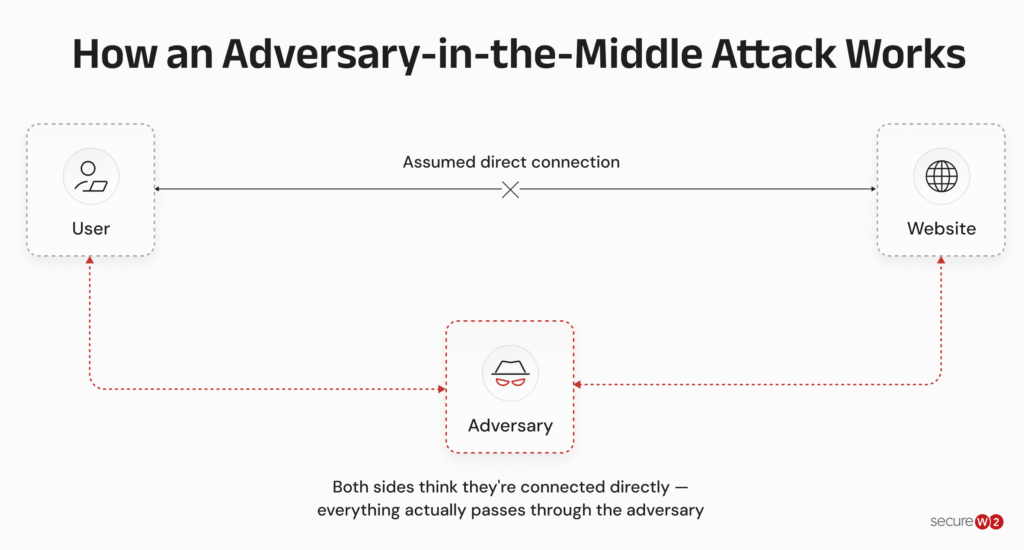
Adversary-In-The-Middle (AiTM) Attack
During an adversary-in-the-middle attack (AiTM), or man-in-the-middle attack, an outsider intercepts DNS queries in transit between the client and the server, manipulating the data so the client connects to the attacker’s server.
By controlling the server to which the client connects, attackers can further their predatory agenda. The image below illustrates how AiTM works:
Pharming Attack
In a pharming attack, attackers manipulate a website’s host file or domain name system to redirect users to a fraudulent website, even when they’ve typed the correct address into their browser.
Please use the image in the task. Thanks!
DNS Hijacking vs. DNS Poisoning
While both DNS hijacking and DNS poisoning are malicious techniques used by hackers to divert internet traffic, they operate in different ways.
We’ve seen that in DNS poisoning, the attacker introduces corrupt DNS data into the DNS resolver’s cache, causing the name server to return an incorrect IP address.
In DNS hijacking, the attacker redirects queries to a different DNS server. It usually involves the alteration of the local host files or the manipulation of the router.
The purpose of DNS hijacking is to lead users to fraudulent websites, where the attacker can steal sensitive data, such as usernames, passwords and credit card information.
For example, a user may think they are visiting their online banking website when, in fact, they are being redirected to a fake version of the site created by the hacker.
Note: DNS hijacking is more about taking control of the server to redirect traffic, while DNS poisoning is about corrupting the data within the server to misdirect web traffic. Both these attacks are threats to user privacy and data security.
Risks of DNS Poisoning Attacks
DNS poisoning attacks have severe implications for organizations, including:
- Credential theft: When users log in to a fraudulent site, attackers can easily steal their login credentials (usernames and passwords).
- Malware: Simply by visiting a fake website or clicking seemingly innocent links on pages, users can inadvertently install malware on their devices. Malware such as ransomware, spyware and trojans can control devices and steal data without a user’s knowledge.
- Falsified security software updates: One form of DNS poisoning spoofs security provider websites. When this happens, users falsely believe they’ve downloaded the latest updates and patches — but instead, they remain vulnerable to continued attacks, new viruses and malware.
- Data and identity theft: Significant data theft is a common fallout, as the attack can expose confidential customer information, intellectual property or sensitive internal data.
- Damaged reputation: Organizations can also face reputational damage, leading to loss of customer trust and potential business.
- Financial loss: The subsequent financial implications of lost business can be debilitating. When customers or clients disappear, it can be difficult or impossible to recover. This affects revenue, profit margins, projections, and the involvement of new or existing investors.
- More severe cyber threats: Moreover, the infiltration into the organization’s network poses a threat of escalated cyberattack severity. On its own, a spoofed website isn’t dangerous, but the potential to infect a device, network, or entire organization can be devastating.
- Recurring issues: Once a device caches an illegitimate IP address, every attempt to visit the real website will redirect online traffic to the illegitimate site instead. While individuals can fix the issue by clearing their device’s cache, shared network caches can quickly re-poison that device and other network devices.
So how do you know if you’ve been targeted by a DNS poisoning attack? Let’s look at the signs.
What Are the Signs of DNS Spoofing?
It’s not easy to tell if you’ve been a victim of DNS poisoning or DNS spoofing, but it’s important to stay vigilant. Here are signs to watch for:
| Sign | What It Means |
| Unexpected redirects | Check that the URL of the site you reach matches the URL you entered, and that the page design and interface are what you expect. Any changes in URL characters or top-level domain (e.g., .com or .org), as well as unfamiliar page design elements (especially login interfaces), may indicate DNS poisoning. |
| Slow load times | When web pages take an unusually long time to load, someone may have intercepted your DNS request. Of course, there are many other reasons for slow load times, so this alone can’t verify a DNS attack. |
| Suspicious content (even on a familiar URL) | DNS spoofing works by sending users to the wrong IP address but the URL in your browser’s address bar typically matches the site you intended to visit. If you notice strange or unexpected content, misspellings and other typos, or other types of errors, you could be on a spoofed site. |
| Unusual ads and popups | Some sites are always full of ads and popups. But if a trusted site that’s typically ad-free shows a wealth of unexpected ads, you may be on a malicious website. |
| SSL/TLS certificate warnings | Browsers verify websites through Secure Sockets Layer/Transport Layer Security certificates (commonly called SSL certificates); if the certificate of the site you’re on doesn’t match the real site’s certificate, you may get a browser warning. |
| Suspicious network traffic | A sudden increase in DNS requests, or unexpected requests, could indicate DNS spoofing. |
If you suspect DNS spoofing, stop using the suspicious site(s) and check your network settings immediately.
The security plan that scales with you.
Our solutions can scale from mid-market to global enterprises. Compare options and see how our solutions protect you from costly breaches and ensure peace of mind.
Best Practices to Prevent DNS Poisoning Attacks
NIST released updated DNS guidelines in March of 2026. NIST SP 800-81r3 outlines several key recommendations to help secure DNS infrastructure.
Here are some ways to strengthen your defenses against DNS poisoning attacks:
- Monitor DNS activity closely
- Flush DNS cache frequently
- Update DNS software regularly
- Operate your own DNS server or use private DNS servers
- Protect your network with authentication protocols
- Encrypt data and communications
- Use virtual private networks (VPNs)
- Train end users
- Implement passwordless security
- Implement DNS security extensions (DNSSEC)
Monitor DNS Activity Closely
Constantly monitoring DNS activity allows for the detection of any suspicious entries in real-time.
Using DNS spoofing detection mechanisms can help spot potential security threats before they become a problem.
If abnormal traffic patterns or unrecognizable DNS responses are detected, it could indicate a DNS poisoning attempt.
Flush DNS Cache Frequently
DNS cache poisoning thrives on cached data.
Both network administrators and individuals should flush network and device cache data routinely, since this flushes out any stored IP addresses that may be fraudulent. It also requires the DNS resolver to request fresh records.
Update DNS Software Regularly
Make it a habit to keep your DNS server software and operating systems updated.
With each update, software developers improve security measures and patch known vulnerabilities that attackers might exploit.
Operate Your Own DNS Server or Use a Private DNS Server
Running your own DNS server allows for better control over DNS requests and responses, thereby reducing the risk of DNS poisoning attacks. Having your own servers essentially ensures that DNS requests aren’t sent to compromised external DNS servers.
Or you could use a private server. A private DNS server only allows DNS requests from recognized and trusted sources, minimizing exposure to potential threats.
With restrictions on who can make DNS requests to your server, it becomes an effective measure against DNS poisoning.
Protect Your Network With Authentication Protocols
Use strong network authentication protocols such as 802.1X, which uses digital certificates for mutual authentication of both the client and the server.
Understand more about 802.1X and why it exists with our video below:
Protocols such as 802.1X can stop malicious attackers before they gain network access.
One district school put this into practice. To protect student devices from MITM and spoofed-network attacks on its Wi-Fi, the school replaced password-based authentication with certificates.
This closed off the interception point attackers were relying on to insert themselves between devices and the network.
Encrypt Data and Communications
Unencrypted connections are vulnerable. But if an attacker infiltrates an encrypted DNS request, they may not be able to manipulate it.
Instead of connectionless UDP ports, encrypt traffic with DNS over HTTPS (DoH) or DNS over TLS (DoT) to protect your data and devices.
Use Virtual Private Networks (VPNs)
VPNs provide an additional layer of security by encrypting communications
between your device and the DNS server.
This encryption makes it harder for attackers to intercept and change DNS data, thus significantly reducing the risk of DNS poisoning attacks.
Train End Users
Network administrators shouldn’t be the only ones who understand the definition, dangers of, and prevention methods for DNS spoofing.
When you invest in training for all users, it’s easier for them to spot the signs, detect phishing attacks and protect your network and organization.
Implement Passwordless Security
One way to prevent credential theft from a DNS poisoning attack is to simply eliminate the use of credentials.
Digital certificates, which are issued and managed by a Public Key Infrastructure (PKI), cannot be stolen or used by other devices. End-users can log into cloud applications, the wired or wireless network or even a VPN using a digital certificate instead of a password.
Using certificates instead of passwords gives you phishing-resistant authentication. It prevents over-the-air credential theft, like an evil twin attack or an adversary-in-the-middle attack. That’s a big reason PKI exists.
Micah Spady, Director of Product Marketing at SecureW2
How does this play out in a real-life scenario? Take the case of a high school that needed a way to protect its VPN and Wi-Fi from rising credential theft attacks. Shared passwords left sensitive staff and student data exposed to potential breaches.
The school swapped passwords for certificate-based authentication, surviving an attack on their firewall within weeks of the switch.
Implement DNS Security Extensions (DNSSEC)
Domain Name System Security Extensions (DNSSEC) add a layer of authentication to the DNS lookup process, verifying data origin and confirming that the DNS response hasn’t been compromised.
With DNSSEC, every DNS record is digitally signed, allowing a validating resolver to verify that the response originated from the authoritative DNS server and has not been modified in transit.
If an attacker attempts to redirect users to a malicious IP address by injecting a forged DNS response, the cryptographic signature validation fails, and the resolver rejects the response. This is illustrated in the image below:
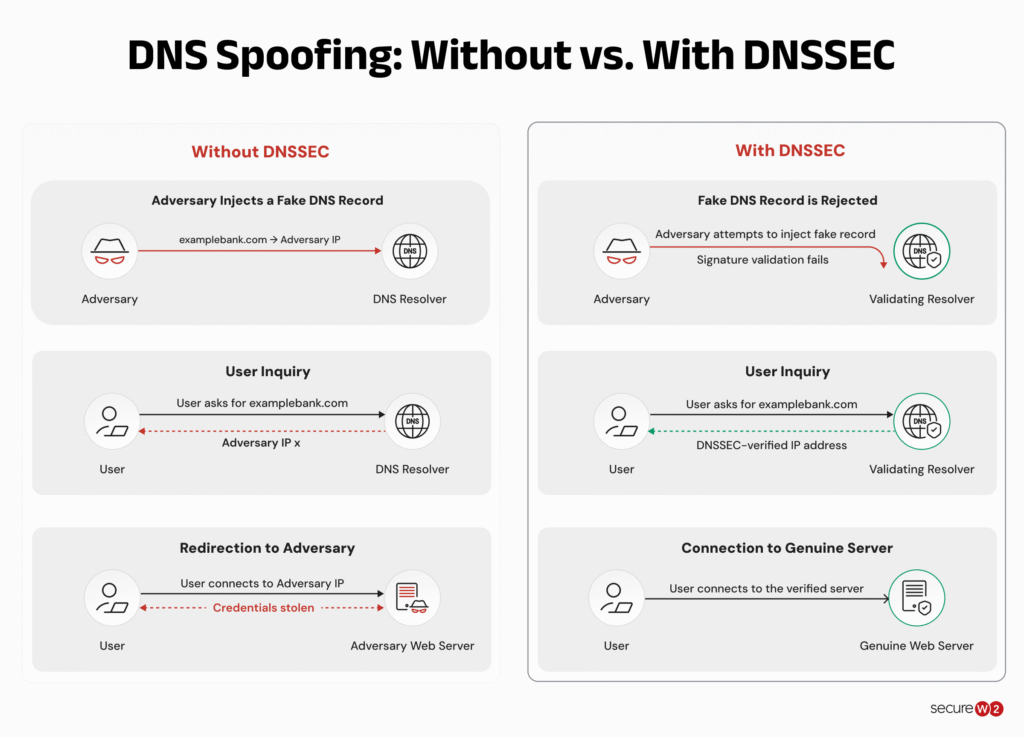
By ensuring the authenticity of the DNS data, DNSSEC goes a long way in preventing DNS spoofing attacks.
DNSSEC is now recognized by the Internet Engineering Task Force (IETF) as the recommended baseline for validating DNS responses and preventing attackers from injecting forged records into the DNS resolution process.
However, DNSSEC does not encrypt DNS traffic. Network observers can still see which domain names users are querying, even if every response is cryptographically validated.
This is why modern enterprise DNS security increasingly combines DNSSEC with DoH or DoT.
How Can SecureW2 Protect You From DNS Poisoning Attacks?
SecureW2 offers robust and cost-effective solutions that protect against DNS poisoning attacks without the complexity of configuring DNS servers in-house.
JoinNow Dynamic PKI provides powerful end-to-end encryption, substantially reducing the risk of DNS spoofing attacks by using certificate-driven authentication instead of credentials.
Our JoinNow Suite ensures that devices are securely onboarded onto the network with correctly configured settings. This reduces the possibility of connecting to fake or insecure networks, thus mitigating the risk of DNS cache poisoning.
In a nutshell, SecureW2 offers a comprehensive security suite for organizations, providing effective defenses against DNS poisoning attacks.
SecureW2 is not just about safeguarding your present; it’s about securing your future.
Schedule a demo to learn how we can protect your organization.
Frequently Asked Questions
What’s the difference between DNS poisoning vs. DNS cache poisoning vs. DNS spoofing?
While DNS poisoning, DNS cache poisoning, and DNS spoofing are often used interchangeably, they have subtle differences:
- DNS poisoning is a broad term encompassing any attack that introduces incorrect IP addresses into the DNS. It may also be called domain poisoning or DNS pollution.
- DNS cache poisoning specifically refers to cases of DNS poisoning where the attacker corrupts the DNS cache data, leading to misdirected queries.
- DNS spoofing involves the attacker responding to a DNS request with false data, causing the server to forward traffic to an incorrect or malicious IP address, hence orchestrating a successful deception.
How do certificates protect networks from DNS poisoning?
Digital certificates issued through a Public Key Infrastructure (PKI) provide strong protection against DNS poisoning by replacing easily stolen or phished passwords with hardware-bound, cryptographic credentials that attackers cannot easily reuse.
In a DNS poisoning attack, the goal is often to redirect users to a fake login page to harvest credentials. Certificate-based authentication changes this dynamic: instead of typing a password that can be captured on a spoofed site, users (or devices) authenticate using a digital certificate, which are extremely difficult to steal or impersonate.
Even if an attacker successfully poisons DNS and redirects traffic, the malicious site will fail certificate-based authentication challenges.
This approach eliminates the risk of credential theft and enables passwordless, phishing-resistant authentication across Wi-Fi, VPNs and cloud applications.
How does encrypting traffic deter DNS poisoning?
Encrypting DNS traffic (primarily through DNS over HTTPS — DoH — or DNS over TLS — DoT) is recommended by NIST because it makes it significantly harder for attackers to intercept, modify, or spoof DNS responses in transit.
Traditional (unencrypted) DNS queries are sent in plain text, allowing attackers performing Man-in-the-Middle attacks to see the request and inject a fake response before the legitimate DNS server replies. Encryption wraps the query and response in a secure tunnel, so attackers cannot easily read the request or forge a believable response without triggering validation failures.
What role does DNSSEC play in prevention?
DNSSEC cryptographically signs DNS records so resolvers can verify they haven’t been tampered with. It’s one of the strongest technical defenses but requires proper implementation by domain owners and support from resolvers.
Is DNS Poisoning still a major threat in 2026?
Yes. While DNSSEC and encrypted DNS have improved defenses, many organizations and home networks remain vulnerable. DNS attacks continue to be common because they are hard to detect and can bypass many traditional security tools.
