Key Points
- Wi-Fi networks are vulnerable to various hacks like MITM, brute force, and phishing, which can result in stolen data or disrupted services.
- Using strong encryption methods, VPNs, and digital certificates significantly reduces the risk of unauthorized access to WiFi networks.
- The SecureW2 JoinNow PKI and Cloud RADIUS solutions offer passwordless authentication, enhancing enterprise Wi-Fi security and simplifying network management.
networks give us quick and easy access to the internet. Unfortunately, hackers often target WiFi networks as potentially vulnerable access points to sensitive data.. An attempt to enter a WiFi network without authorization is called a “WiFi hack.” WiFi attacks exploit security weaknesses or vulnerabilities, allowing attackers to steal private information or disrupt routine network operations.
In this article, we’ll examine the definition of WiFi hacking, popular methods for breaking into WiFi networks and offer helpful tips for protecting your network and guaranteeing a safe online experience.
What Is WiFi Hacking?
WiFi hacking is the act of infiltrating a wireless network that you aren’t authorized to access.
There are many ways to hack WiFi, from technologically advanced methods (like intercepting legitimate user connections) to basic or even randomized methods
(like correctly guessing user credentials). No matter the method, hacking Wi-Fi can do serious damage to your organization’s data.
How to Hack a WiFi Password: 9 Common Attack Methods
There are various kinds of WiFi hacks, and each poses a different risk to both individuals and companies. In this section, we’ll review different types of WiFi hacks you should know about.
1. Man-in-the-middle Attack
A man-in-the-middle (MITM) attack occurs when the culprit puts himself into a conversation between a user and an application, either to eavesdrop or to mimic one of the parties, giving the impression that a regular flow of information is occurring.
The attacker aims to get personal data, including credit card numbers, account information, and login passwords. Users of banking apps, SaaS companies, e-commerce websites, and other websites requiring logins are usually the targets.
Attackers may utilize information gathered during an attack for various things, such as identity theft, unauthorized financial transactions, or unauthorized password changes.
They can also establish a foothold within a guarded area while an advanced persistent threat (APT) attack is in its infiltration phase.
We can compareMan-in-the-Middle (MITM) attacks to the mailman reading your bank statement, noting your account information, resealing the package, and having it delivered to your door.

2. Brute Force Attack
Brute force attacks are a well-known method of bypassing security. In a brute force attack, the chance of gaining unauthorized access to a framework is increased by “speculating” on usernames and passwords. Brute force is a very successful attack tactic that is simple to use.
In a brute force attack, attackers employ specialized applications or simply guess passwords. Hackers’ tools assess different combinations of secret words to discover passwords and avoid filling out confirmation forms. Attackers try to access web applications in various ways by looking for the proper session ID. The end result of a successful brute force attack could be stealing information, infecting websites with malware, or interfering with assistance.
Almost all brute force attacks are carried out by bots; however, some attackers still use manual methods. Attackers have arranged for commonly used certifications, or legitimate customer credentials, obtained through security lapses. Bots attempt these accreditation arrangements on purpose, attack targets, and notify the attacker when they have access.
There are a few common subtypes of brute force attack:
Wi-Fi Protected Setup (WPS) Attacks – WPS features an 8-digit PIN used to connect to the internet via your WiFi. While potentially easier for users to remember compared to a standard password, these PINs aren’t any more secure than a standard password.
Wi-Fi Protected Access (WPA/WPA2) Attacks – WPA and the more advanced WPA2 use encryption with pre-shared keys (PSK) to protect WiFi access. Still, attackers can infiltrate while the network and router communicate. They send de-authentication packets to prevent users from connecting; when users attempt to reconnect, the attacker slips into the connection. This way, they can crack WiFi passwords using ALFA network adapters or similar technology.
Dictionary Attacks – These attacks use dictionaries of common words, along with numbers and symbols commonly used in passwords, to take educated guesses at a user’s password. Along with multi-lingual capabilities, some tools allow customization based on character length, complexity requirements, and common misspellings.
Random Guesses – In lieu of more sophisticated methods, random guessing can still help hackers gain access to WiFi, personal accounts, business accounts, and more. Guessing can work for user-specific hacks or widespread attacks like password spraying, which we’ll define next.
Password Spraying – Instead of trying many possible passwords to access one account, password spraying means trying a small number of common passwords across a wide number of accounts. Unfortunately, many users leave themselves vulnerable by relying on default passwords and easy guesses, including “123456,” “111111,” “admin,” and even “password.”
3. Phishing Attack
An effort to get sensitive information, usually in usernames, passwords, credit card numbers, bank account information, or other critical data, to use or sell the information is called “phishing.” Similar to how a fisherman uses bait to capture fish, an attacker tricks the victim by posing as a reliable source and making an alluring request.
Phishing is often used to accomplish other malicious activities, such as cross-site scripting and on-path attacks. These assaults fall into a few broad types, usually over email or instant messaging. To recognize phishing attacks in the wild, it’s helpful to familiarize yourself with a couple of these attack vectors.
Cross-site Scripting – In a cross-site scripting (XSS) attack, attackers add malicious code to a trustworthy website to run when the victim views it. There are several ways to introduce that unsafe code. The most common uses are posting it straight onto a page showcasing user-generated content or appending it to the end of a URL.
On-path Attacks – Attackers using an on-path approach insert themselves in the way of two devices (usually a web browser and a web server) to intercept or alter communications between the two. This allows the attackers to get information and adopt the identity of two agents.
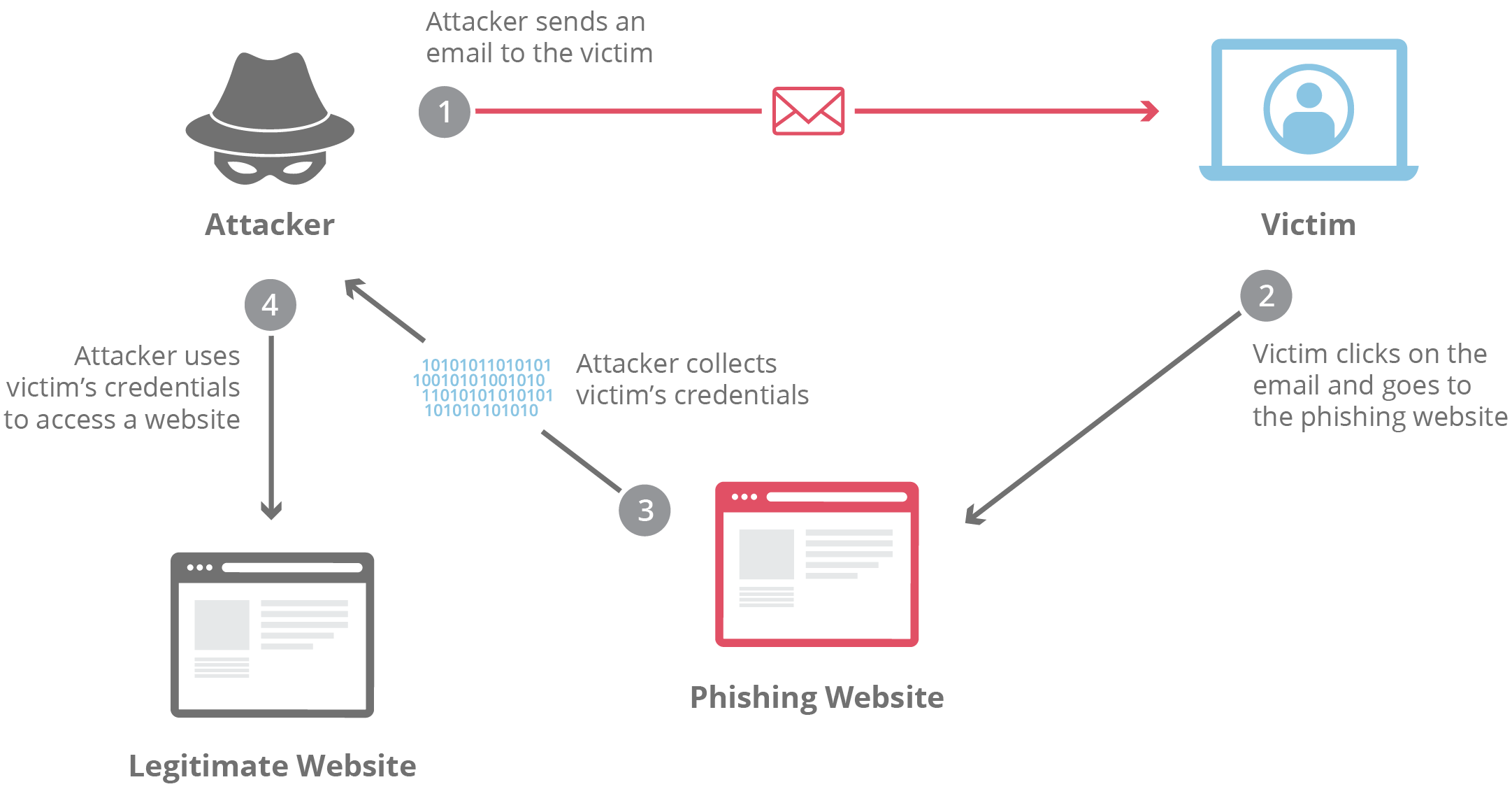
Phishing is one type of social engineering attack. Social engineering, in general, describes most techniques that take advantage of mistakes made by others to get valuables, private information, or access. Cybercriminals often utilize these “human hacking” schemes to trick gullible people into divulging personal information, disseminating malicious programs, or granting access to forbidden systems. Attacks can occur through various contacts, in person and online.
Social engineering-based scams revolve around human behavior and thought patterns. Therefore, social engineering assaults effectively influence a user’s behavior. An attacker may successfully trick and control a user if they know what drives their behavior.
4. Evil Twin AP Attacks
A rogue wireless access point (AP) that poses as genuine and steals confidential data without the end user’s awareness is known as an evil twin attack. Attackers use a smartphone or other internet-capable gadget, together with certain readily accessible software, to construct an evil twin quickly.
Attackers place themselves near a genuine wireless network and allow their devices to identify the radio frequency and service set identification used by the real AP. Then, they broadcast their own radio signal using the same name as the official AP.
The evil twin AP appears to the end user to be a hotspot with a strong signal.
This is because the attackers have not only impersonated the “good twin” by using the same wi-fi network name and configurations but also physically positioned themselves close to the end user, where the signal is most likely to be strongest.
The evil twin becomes the end user’s wireless AP if the powerful signal tricks users into manually connecting, or if the user’s computer automatically selects the fake AP due to its promiscuous mode.

5. Replay Attack
Replay attacks happen when hackers listen in on a secure network conversation, intercepts it, and then deceitfully delays or resends it to trick the recipient into completing the hacker’s desired action. Replay attacks carry an additional risk in that a hacker can capture a communication from the network and decode it without the need for sophisticated abilities. Just resending the entire thing might make the assault successful.
Think about this actual attack scenario. A staff member sends an encrypted message to the company’s finance administrator requesting a money transfer. This communication is intercepted by an attacker, who then has the ability to resend it. The communication seems authentic to the financial administrator and is already appropriately encrypted because it is a valid message that has just been resent.
Unless there is a valid cause to be suspicious, the financial administrator will probably reply to this new request, and may send a sizable quantity of money to the attacker’s bank account as part of that response.
6. Packet Sniffing
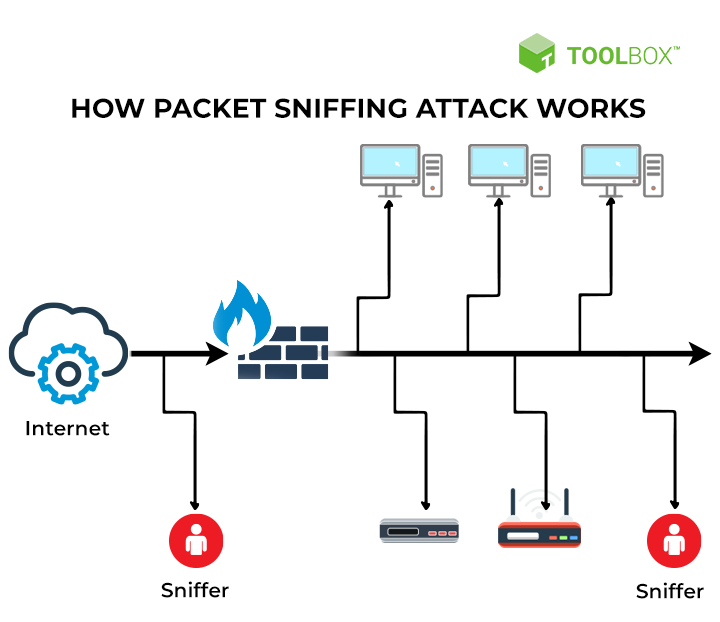
How do hackers steal data with public WiFi? A “packet sniffing” hacking method entails gathering data packets as they pass over an unprotected computer network. Packet sniffers aim to collect sensitive data (such as private financial information) and sell it or use it in further attacks. They do this by monitoring the data packets in network traffic.
A packet sniffing attack operates by keeping an eye on someone else’s Wi-Fi network activity and gathering information sent to and from the internet via your network. The data that has been “sniffed” might contain any information that travels over the network or private information such as login passwords or financial information. Attackers can then use the information obtained via sniffing in subsequent hacking efforts.
Use a VPN to encrypt your connection and help stop hackers from obtaining any personal data you post online if you’re connected to any public Wi-Fi networks like a coffee shop, airport, or hotel. Sniffing attacks are most effective on unencrypted networks. And stick to websites you are certain are secure.
7. Jamming Attacks
Jamming attacks use unwanted interference on wireless communication systems such as Wi-Fi, Bluetooth, and mobile phone or home networks. Jamming attacks can also be directed at GPS systems.
The goal of a jamming attack is to “jam” a network, which can stop other devices from interacting, interfere with the provision of necessary services, or even cause a denial of service (DOS) attack that takes down the network completely.
Hackers typically use physical devices in jamming attacks to flood a network with powerful signals and interfere with regular operations. Call spoofing is one example of a telecommunications fraud attack that fraudsters might use to capitalize on the service disruption and uncertainty it causes for callers.
Jamming attacks can occur on a local or large scale. They can be employed for comparatively small goals, militarized as a strategy during a conflict, or in terrorist acts. Jamming attacks, for instance, can be used to silence Bluetooth speakers during a noisy party in the neighborhood.

8. MAC Spoofing
Spoofing means changing your MAC address. You cannot modify the physical address on your devices; however, there are applications on a network that can allow you to do this. MAC spoofing offers benefits such as gaining access to networks restricted to specific MAC addresses, concealing the true identity of the originating device, and preventing tracking or traceback.
However, MAC spoofing may also be employed maliciously. Data delivered to your device may be redirected to another device, giving an attacker access to your data by imitating your MAC address.
A MAC spoofing attack occurs when a hacker modifies their device’s MAC address to coincide with another on a network to obtain unapproved access or initiate a Man-in-the-Middle attack. It can be used to conceal the identity of the attacker’s equipment and get beyond network WiFi security settings, like MAC filtering, that rely on the MAC address.

9. Credential Stuffing
Not all attacks require technological expertise. With credential stuffing, attackers uncover or purchase stolen login credentials (email addresses, usernames, and passwords), enabling them to log in to sites and applications without complex hacking or even guessing.
Since so many users repurpose the same credentials across multiple websites, services, and applications, attackers might only get the confirmed username and password for one platform — but by reusing those credentials, they’re likely to gain access to many other services. Credential-stuffing tools use automation to make this process easier and faster.
Why are Wi Fi Passwords Vulnerable?
Once regarded as the first line of defense for online accounts, passwords are now frequently the weakest link because of common flaws. One significant risk is the common practice of people reusing WiFi passwords for many accounts. Using this technique, a password breach for one service could be used as a key for several others.
Hackers take advantage of this inclination and profit from platform vulnerabilities that are less secure to obtain unauthorized access to more sensitive accounts. The cumulative impact of reusing the same wi-fi password emphasizes how important it is for consumers to develop a fresh passphrase for every online transaction.
The widespread usage of obvious passwords provides hackers with an open invitation to commit fraud. Still, many people choose easy options like “password123” or simple information, such as birthdays or pet names.
These recurring trends make it simple for automated password-cracking software to compromise accounts quickly. Users must use strong and complicated password combinations to strengthen their digital defenses since cyber criminals frequently utilize advanced algorithms that can quickly read a weak wi-fi password.
The increasing sophistication of cyber threats necessitates adopting more secure authentication procedures, which are becoming increasingly important as technology develops.
Devices Most Vulnerable to Hacking
In addition to network security, don’t neglect device protection — especially for these:
- Wi-Fi Routers and Network Hardware: A common entry point for network attacks, improperly secured routers and other network hardware leave your entire organization vulnerable. With secure network access, hackers can more easily attack connected devices.
- Smartphones: Mobile phones, particularly those running open-source operating systems such as Android, are vulnerable to attacks.
- Internet of Things (IoT) Devices: From smart thermostats and webcams to wearable medical devices, IoT devices are susceptible to attacks. The consequences of these attacks can be extremely serious — and in some cases, deadly.
How to Tell If You’ve Been Hacked
Your network may have been hacked if you experience:
- Unknown devices connected to your network
- Unusually high data usage
- Irregular network activity, including access from unusual locations or at unusual times
- Difficulty connecting to your network
- Frequent disconnections
If you notice these signs, disable your network immediately — power down and unplug your router, disconnect Ethernet cables, and strengthen security protocols before reconnecting.
Preventive Measures for Your Wi Fi Network Security
Protect yourself from WiFi vulnerabilities with these best practices.
Monitor Network Activity
Observe, log, and review network activity reports regularly to spot unusual activity, deviations from typical trends, and unfamiliar or unexpected device connections. Manual checks may be sufficient for smaller networks and organizations, but they aren’t scalable. Instead, integrate automation to streamline network monitoring without sacrificing security.
Segment Your Network
The more devices and users your network supports, the more important network segmentation becomes. Smaller segments isolate attacks, preventing widespread data breaches. Network segmentation best practices include subnet masks, Mac authentication, Bring Your Own Device (BYOD) segmentation, and clearly documented network policies.
Implement Modern Authentication Protocols and Encryption Standards
Authentication protocols, like 802.1X. are a frontline defense against network attacks. For certain organizations, including those conducting federal research, authentication is also a compliance issue.
Also, remember that encryption doesn’t guarantee protection,especially with older encryption standards. Wired Equivalent Privacy (WEP), the original Wi-Fi Protected Access (WPA), and Wi-Fi Protected Setup (WPS) are outdated, leaving you vulnerable.
Disable WPS and use advanced encryption such as WPA3, or WPA2 with Advanced Encryption Standard (AES) and Counter Mode Cipher Block Chaining Message Authentication Code Protocol (CCMP), for more protection.
Use a Virtual Private Network (VPN)
Virtual Private Networks (VPNs) provide secure remote access by obscuring device and user locations. This makes VPNs a popular choice for organizations that exchange sensitive data across managed and unmanaged devices.
Update Firmware and Software Regularly
Updates are a critical way to keep networks safe against new threats. Cyberattacks are constantly evolving, which makes it so important to update protections. It’s a best practice to opt in to automatic updates for router firmware, critical software, and managed devices.
Transition from Passwords to Digital Certificates
The transition from conventional passwords to digital certificates represents a fundamental change in wi-fi network security.
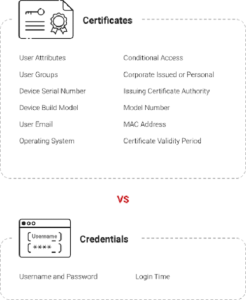
Digital certificates contain information on the type of user, whether they possess a corporate or personal devices, the brand and model of the device, and when they were last permitted to access it.
Instead of relying on passwords, organizations can now make informed, context-driven decisions about granting network access. Revoking or changing permission is also easier, with the wealth of data that digital certificates provide.
Why Go Passwordless?
Passwords alone don’t provide enough information and context to keep your network secure. Because credentials are easily transferred or stolen, they don’t give business owners the information they need about the people trying to access their network. They also don’t reflect changes in employment status, or other changes that might impact network access.
Digital certificates, in contrast, deliver a wealth of information about user identification, device information, authorization history, and current organizational responsibilities. Going passwordless is a great way to protect your network against malicious actors and keep it safe for all of your authorized users.
Strong Network Security with the SecureW2 JoinNow PKI and Cloud RADIUS
Wi-Fi security measures are more important than ever. As WiFi attacks grow more complex, passwords alone can’t keep your network secure. That’s where digital certificates come in.
JoinNow PKI and Cloud RADIUS from SecureW2 deliver purpose-built, passwordless security solutions that are intuitive to implement and deploy.
Cloud RADIUS protects your network with an extra layer of validation, so that only authorized devices can gain access. This gives managers visibility into the whole authentication process, and enables centralized administration.
Ready to implement the next generation in security measures? Schedule your demo today and discover how SecureW2 can fortify your defenses against Wi-Fi vulnerabilities.
