Key Takeaways
- Wi-Fi security uses encryption, authentication and data integrity checks to protect wireless networks from unauthorized access and cyberthreats.
- Wi-Fi protocols such as WEP, WPA, WPA2 and WPA3 specify network security standards. WPA3 is the strongest encryption protocol against modern threats, though WPA2 is the current standard.
- Best practices to improve Wi-Fi security differ by environment. Enterprise networks should implement certificate-based authentication for increased Wi-Fi security. Onboarding technology and PKI services like SecureW2 simplify deployment.
Wi-Fi security is about protecting wireless networks and connected devices from unauthorized access, data interception and cyberattacks.
Unlike wired connections, wireless signals effectively extend a network’s perimeter into public spaces where any motivated actor can attempt to exploit its vulnerabilities.
For IT teams managing enterprise, education or healthcare environments, weak Wi-Fi security is one of the fastest paths to a credential-based breach. That’s why wireless network security is important.
This guide covers the wireless security protocols in use today, the most common Wi-Fi threats targeting organizations and the practical steps IT teams can take to implement effective Wi-Fi security protocols, from basic configuration changes to certificate-based authentication with 802.1X.
What Is Wi-Fi Security?
Wi-Fi security is a systematic approach to protect devices, users and organizations on wireless internet connections. It may involve a combination of hardware, software, devices and processes.
Wi-Fi security matters because without it, anyone can gain access to a network. Attackers can infiltrate Wi-Fi networks by being within physical range of a wireless access point or router or near a connected device. They can also attack virtually, spoofing IP addresses or intercepting communications between client and network servers.
What Are Wi-Fi Security Protocols?
Wi-Fi security protocols are systems designed to protect wireless networks and connected network devices through advanced encryption methods. Without encryption, attackers can easily connect to your network, access your data and save, alter or delete content and security settings.
Wired networks are typically more difficult to intercept. While Wi-Fi is more vulnerable, it’s also more accessible, making strong security an essential component of business and personal wireless use. That’s why it’s critical to choose the right encryption algorithm.
There are four main Wi-Fi security protocols: WEP, WPA, WPA2 and WPA3.
Risks and Security Issues of Unsecured Public Networks
Any wireless device can access public, open or unsecured guest networks within wireless signal range. When an attacker gains access to your network, they can exploit security vulnerabilities in your network, organization or any user devices or accounts connected to the same network.
Unsecured networks make it easier for attackers to steal personal or corporate sensitive data, including credentials and financial information. Attackers can also infiltrate communications over the network, further breaching privacy.
While older devices can be more vulnerable, the risk applies to all devices and network hardware.
Note: To truly protect your network, organization, data and users, avoid unsecured networks (especially for mission-critical networks and activities). Instead, implement the right Wi-Fi security and network encryption protocols.
How Does Wi-Fi Security Work? The Three Pillars
Wi-Fi security relies on three mechanisms working together: encryption, authentication and message integrity.
- Encryption scrambles data transmitted between a device and the access point so that intercepted packets are unreadable without the correct encryption key.
- Authentication verifies the identity of devices and users before granting network access.
- Message integrity protects data against interception or tampering; message integrity checks provide confirmation upon receipt.
Wireless security protocols like Wired Equivalent Privacy (WEP), Wi-Fi Protected Access (WPA), Wi-Fi Protected Access 2 (WPA2), and Wi-Fi Protected Access 3 (WPA3) all definehow encryption and authentication are implemented. The protocol your network uses determines how strong that protection is.
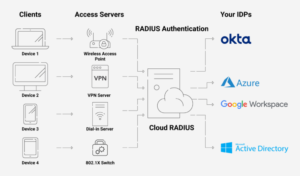
In enterprise environments, authentication typically involves a RADIUS server that validates each connection against an identity provider (IdP) such as Entra ID, Okta or Google Workspace (as shown in the image below). This is the foundation of 802.1X network access control.
Types of Wi-Fi Security Protocols: WEP, WPA, WPA2, and WPA3
Four wireless security protocols have been ratified by the Wi-Fi Alliance since the late 1990s. Each generation built on the older technology and addressed weaknesses in its predecessor.
The following table compares all four protocols.
| Encryption Standard | WEP | WPA | WPA2 | WPA3 |
| Year Launched | 1997 | 2003 | 2004 | 2018 |
| Key Size | 64- or 128-bit (40- or 104-bit plus 24-bit IV) | 128-bit | 128-bit | 128- or 256-bit |
| Cipher Type and Suite | Stream: RC4 | Stream: RC4 and TKIP | Block: AES-CCMP | Block: AES-CCMP 128 (Personal) / AES-GCMP 256 (Enterprise 192-bit mode) |
| Authentication Type | Open system, Static shared keys | Ephemeral keys and 4-way handshake via PSK or 802.1x | Ephemeral keys and 4-way handshake via PSK or 802.1x | SAE (Personal) / 802.1X (Enterprise) with Ephemeral Keys |
| Benefits | Best security at time of launch in 1997 | Increased security with shift to ephemeral keys and MIC | Block cipher delivers advanced encryption; EAP-TLS boosts security | SAE prevents dictionary attacks and protects session data |
| Vulnerabilities | Outdated, easily decrypted today | TKIP is outdated, easily decrypted today | KRACK traffic decryption (fixed with patch) | While not impenetrable, WPA3 offers highest protection today |
| Recommended? | Not since 2004 | Not since WPA2 | Yes, if WPA3 is unavailable | Yes |
Wired Equivalent Privacy (WEP)
WEP was the first wireless security protocol, ratified in 1997. It uses Rivest Cipher 4 (RC4) stream cipher encryption with static 40-bit or 104-bit secret keys and a 24-bit initialization vector (IV) to create 64- or 128-bit keys.
Today, WEP encryption is fundamentally broken. The protocol suffers from critical architectural flaws that render its cryptographic protections virtually useless against modern decryption techniques.
Researchers demonstrated reliable key-recovery attacks as early as 2001, and modern tools can crack a WEP key in minutes. The Wi-Fi Alliance officially retired WEP in 2004. Any network still running WEP should be considered unencrypted.
See your security gap before attackers do.
See continuous trust in action on a platform that includes RADIUS, PKI and AI security.
Wi-Fi Protected Access (WPA)
WPA shipped in 2003 as a stopgap while WPA2 was finalized. It introduced the Temporal Key Integrity Protocol (TKIP), which generates a new 128-bit key for each packet. Known as ephemeral keys, these one-time-use keys were a major improvement over WEP’s static keys.
WPA also added a Message Integrity Check (MIC) to detect packet tampering. While WPA was a significant step forward, TKIP itself has known vulnerabilities and is no longer considered secure.
Wi-Fi Protected Access 2 (WPA2)
In 2004, WPA2 introduced a significant security upgrade by replacing the aging TKIP protocol with the Counter Mode Cipher Block Chaining Message Authentication Code Protocol, or CCMP. CCMP is built on the Advanced Encryption Standard (AES).
The AES-CCMP combination remains highly secure and has served as the industrystandard since the Wi-Fi Alliance mandated it for all certified devices in 2006.
The 128-bit WPA2 operates in two modes:
- WPA2-Personal (PSK): A single pre-shared key (password) authenticates all users. Suitable for home networks but a liability in organizations where passwords are shared, written down or leaked.
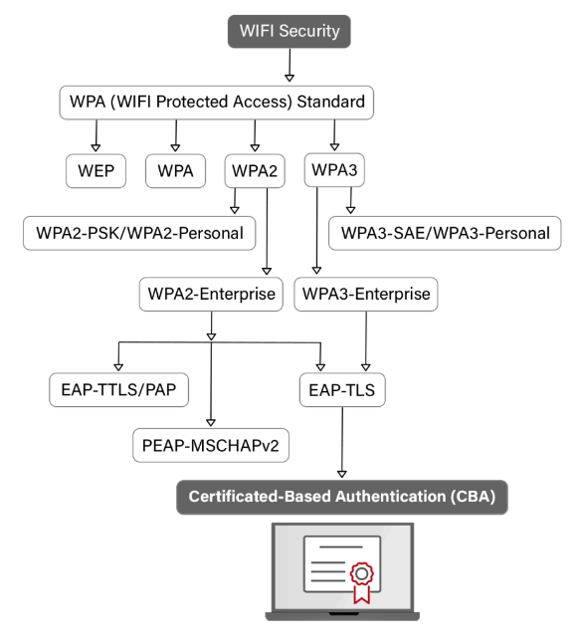
- WPA2-Enterprise: Each user authenticates individually through a RADIUS server using the 802.1X framework. Authentication methods include password-based protocols like PEAP-MSCHAPv2 and certificate-based EAP-TLS, which eliminates passwords from the authentication process entirely.
WPA2-Enterprise with EAP-TLS is widely regarded as the gold standard of Wi-Fi authentication methods, because it relies on cryptographic certificates rather than credentials that can be phished or brute-forced.
Info: However, the protocol does have a known vulnerability. The 2017 KRACK (Key Reinstallation Attack) demonstrated that an attacker within range could force nonce reuse in the WPA2 four-way handshake, potentially decrypting traffic.
Most vendors patched this promptly, but it underscored the importance of keeping firmware current.
Wi-Fi Protected Access 3 (WPA3)
WPA3, certified in 2018 and required on all new Wi-Fi certified products since 2020, addresses several WPA2 weaknesses, as follows:
- Simultaneous Authentication of Equals (SAE): Replaces the PSK four-way handshake with a zero-knowledge proof protocol that resists offline dictionary attacks and provides forward secrecy.
- 192-bit security mode (WPA3-Enterprise): Uses a Commercial National Security Algorithm (CNSA) suite with AES-256-GCM encryption and SHA-384, designed for government and high-security environments.
- Opportunistic Wireless Encryption (OWE): Encrypts traffic on open networks (like guest Wi-Fi) without requiring a password, replacing the completely unencrypted connections of legacy open networks.
- Protected Management Frames (PMF):A mandatory feature in WPA3, preventing deauthentication and disassociation attacks that were commonly used to force clients off a network.
WPA3-Enterprise with 802.1X and certificate-based authentication represents the strongest combination of Wi-Fi encryption and access control currently available.
See how certificates and passwords stack up in our video on 802.1X Wi-Fi authentication below.
The flowchart below shows how select Wi-Fi protocols support certificate-based authentication.
WPA2 vs. WPA3: Which Wi-Fi Security Protocol Should You Use?
WPA3-Personal offers a clear advantage for home users by using SAE to thwart brute-force attacks. For organizations, however, the WPA2 vs. WPA3 comparison is more complex.
WPA3 provides incremental encryption upgrades, but the most significant security gains are found in the authentication method rather than the protocol version itself. Moving away from vulnerable passwords and toward certificate-based authentication is the most critical step a team can take.
Because both WPA2-Enterprise and WPA3-Enterprise support EAP-TLS, you can achieve robust security even if your current infrastructure does not yet support WPA3.
Ultimately, the transition from shared passwords to individual digital certificates is a far more impactful security upgrade than the shift from WPA2 to WPA3.
In the following video, we explain why Wi-Fi passwords are insufficient.
What Are Wi-Fi Security Software and Devices?
Wi-Fi security software protects against wireless communication threats to enterprise and personal users. It may come from internet service providers, comprehensive cloud security solutions, or other third parties.
Wi-Fi security software is designed to protect network devices (routers, switches, access points, etc.), personal and professional devices (computers, mobile devices), and admin and user accounts.
Wi-Fi security devices are specialized devices designed to block threats to your network. Each unique type of Wi-Fi security device serves a distinct but important role in combating active threats, identifying potential threats and preventing attacks.
Types of Wi-Fi Security Devices
Wi-Fi security devices can detect, destroy and deter security risks. They may be physical hardware or virtual devices. The four main types of Wi-Fi security devices are:
- Active devices that detect and block incoming threats, including content filters and firewalls.
- Passive devices that respond to requests from wireless routers, identifying unwanted network traffic on request.
- Preventive devices that proactively search for potential threats; one example is a Wireless Intrusion Prevention System (WIPS), which searches for and prevents communication with rogue access points.
- Unified threat management (UTM) systems that combine active, passive and preventive functions into one physical device or virtual system. Cloud-based solutions combining RADIUS and PKI can encrypt connections, deliver real-time alerts and instantly grant or revoke access to protect your network.
Common Wi-Fi Security Threats
Understanding the threat landscape helps IT teams prioritize the right defenses. These are the attacks most frequentlytargeting wireless networks.
Man-in-the-Middle (MITM) Attacks
In a MITM attack, an adversary intercepts communication between a client device and the access point. The attacker can eavesdrop on traffic, steal credentials or inject malicious content.
MITM attacks are particularly effective against networks using password-based authentication, where credentials are transmitted during the handshake. The right MITM tools can help prevent these attacks.
See our video below for a more detailed explanation of MITM attacks.
Evil Twin Attacks
In an evil twin attack, an attacker sets up a rogueaccesspoint with the same SSID as a legitimate network. Client devices, especially those configured to auto-connect, may join the attacker’s network instead. From there, the attacker can capture credentials, redirect DNS queries or serve phishing pages. The image below offers a visual of how evil twin attacks work.
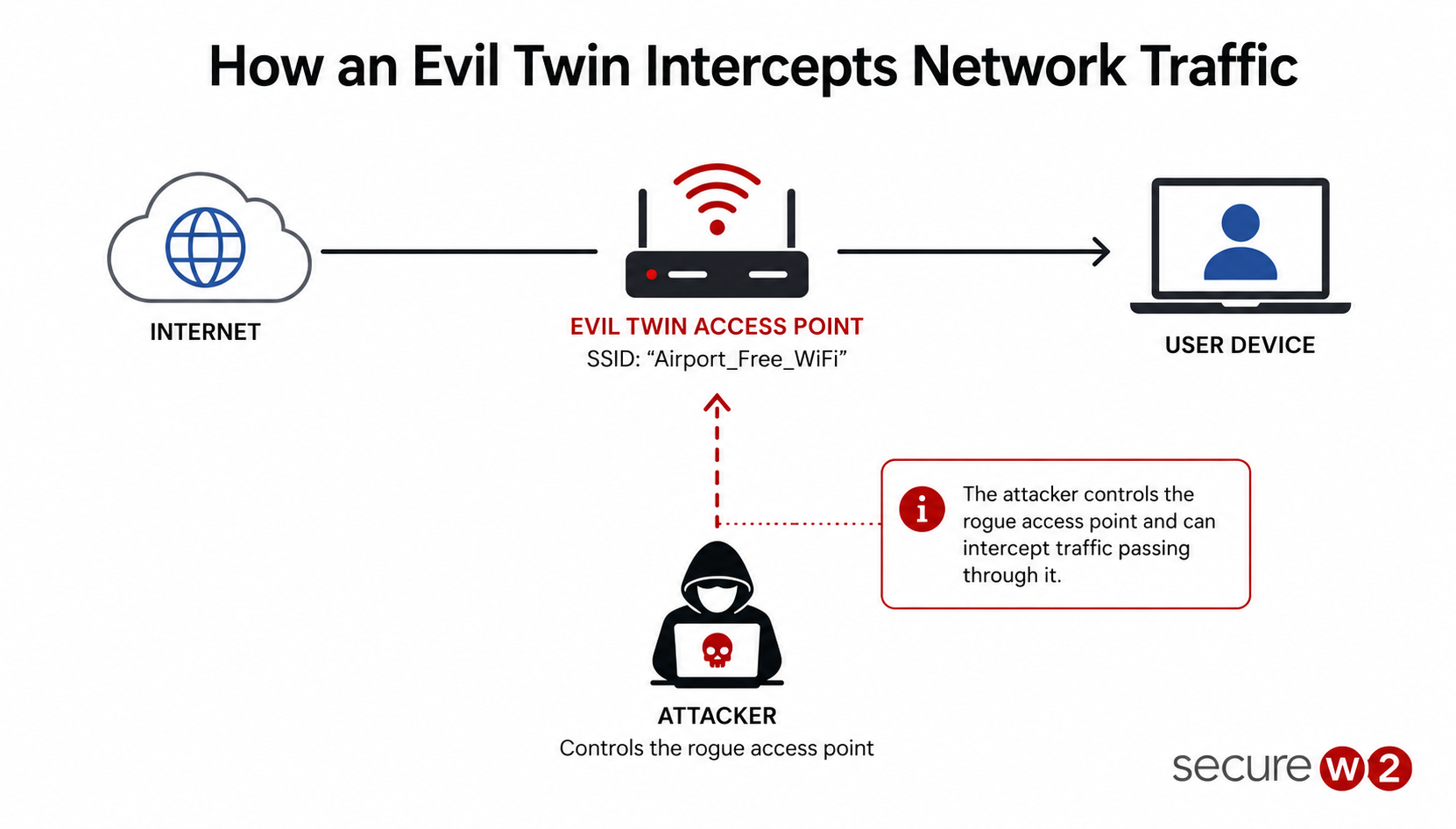
Server certificate validation (a requirement in WPA3-Enterprise) and 802.1X with EAP-TLS prevent clients from connecting to rogue APs that cannot present a valid certificate.
IP Spoofing
IP spoofing occurs when an attacker establishes a false IP address while attempting to gain access to your network. The fake IP seems trustworthy and doesn’t interfere with the true source of the address, allowing attackers to unleash Distributed Denial of Service (DDoS) attacks on devices and networks with relative ease.
The security plan that scales with you.
Our solutions can scale from mid-market to global enterprises. Compare options and see how our solutions protect you from costly breaches and ensure peace of mind.
Credential Theft and Brute Force Attacks
Pre-shared keys can be captured during the WPA2 four-way handshake and cracked offline using dictionary or brute-force tools. The stronger the PSK, the longer the attack takes. But given enough time, any shared password is vulnerable.
WPA3-SAE makes offline cracking infeasible, and certificate-based authentication removes passwords from the equation entirely.
KRACK and Protocol-Level Vulnerabilities
The 2017 Key Reinstallation Attack (KRACK) exploited a flaw in the WPA2 handshake to decrypt traffic without knowing the network password. While patches addressed the specific vulnerability, KRACK illustrated that protocol-level flaws can affect even well-configured networks.
Keeping firmware and drivers up to date is a baseline requirement.
DNS Poisoning
Domain Name System (DNS) poisoning is a broad term for any attack on a DNS, including passively or actively altering IP addresses to redirect traffic to incorrect websites.
Types of DNS poisoning include:
- DNS cache poisoning (when a bad actor corrupts DNS cache data, altering or obscuring the cache records of DNS lookups and sending users to the wrong website)
- DNS spoofing (when an attacker responds to a DNS request with false data)
Rogue Access Points
An unauthorized access point connected to the corporate network, whether deployed by an employee for convenience or by an attacker, creates a backdoor that bypasses perimeter security.
Wireless intrusion detection systems (WIDS) and network access control with 802.1X help detect and block unauthorized APs.
Packet Sniffing
On networks that are unencrypted or use outdated security, attackers can use free tools like Wireshark to interceptdatapackets as they travel through the air. This captured traffic often contains unencrypted credentials, session tokens and other sensitive information.
Implementing strong Wi-Fi encryption, such as WPA2 or WPA3 using AES, protects this data by ensuring that even if packets are intercepted, they remain unreadable to unauthorized parties.
NIST SP 1800-35: A Zero Trust Reference Architecture for Enterprise Wi-Fi Security
Enterprise Wi-Fi security is no longer just about using strong encryption or deploying 802.1X authentication. As organizations adopt zero-trust security models, wireless networks are expected to continuously verify users and devices rather than simply granting access after a successful login.
This shift is reflected in NIST Special Publication 1800-35, Implementing a Zero Trust Architecture, which was finalized in June 2025 and provides one of the most comprehensive implementation guides available for building zero-trust environments.
The publication builds on NIST SP 800-207, which introduced the core principles of zero trust in 2020. While SP 800-207 focused on the overall architecture, SP 1800-35 demonstrates how those principles can be implemented using commercially available technologies.
Developed by the National Cybersecurity Center of Excellence (NCCoE) with contributions from 24 industry partners, the guide documents 19 tested reference architectures and maps them to the NIST Cybersecurity Framework and NIST SP 800-53 Revision 5 security controls.
Info: Organizations can review the complete guidance at: NIST SP 1800-35: Implementing a Zero Trust Architecture.
For enterprise Wi-Fi, one of the publication’s key recommendations is that access decisions should not be treated as a one-time event. Traditional 802.1X deployments often authenticate a user or device when it first connects to the network and then allow that session to continue with little additional verification.
A zero-trust approach assumes that trust should be continuously evaluated throughout the session. User identity, device identity, security posture and policy compliance are all treated as dynamic signals that can change over time.
This has practical implications for organizations modernizing their wireless infrastructure. RADIUS servers should integrate with identity providers to perform real-time authentication and authorization, while endpoint detection and response (EDR) and mobile device management (MDM) platforms should continuously provide device health and compliance information.
Note: If a device becomes non-compliant or its risk level changes, network access policies should be updated immediately rather than waiting for the next authentication event.
As organizations continue deploying WPA3-Enterprise and EAP-TLS, NIST’s guidance makes it clear that strong authentication alone is no longer enough. Combining certificate-based authentication with continuous identity verification, device posture assessment and dynamic policy enforcement creates a Wi-Fi security architecture that is far better aligned with modern zero trust principles and today’s evolving threat landscape.
How to Secure Your Wi-Fi Network
The right approach to secure your Wi-Fi network depends on the environment. Home networks, public hotspots and enterprise networks all have different risk profiles and different solutions.
Below are the best practices for some common types of Wi-Fi networks.
Home Wi-Fi Network Security Best Practices
To secure a home Wi-Fi network:
- Use WPA3-Personal or WPA2-AES as the encryption mode. Disable WEP and WPA/TKIP.
- Change the default router admin password, username and SSID. Default credentials are publicly documented for most router models.
- Use a strong passphrase. It should contain at least 16 characters, combining unrelated words, numbers and symbols.
- Enable the router firewall and disable Wi-Fi Protected Setup (WPS), which has known brute-force vulnerabilities.
- Keep router firmware updated. Most device manufacturers release patches for newly discovered vulnerabilities.
- Disable remote management unless you specifically need it.
Public Wi-Fi Security Best Practices
Public Wi-Fi networks in high-traffic environments like airports, hotels, and cafes are prime targets for exploitation due to their open nature and high density of diverse devices.
To harden these networks and protect the integrity of the provided service, administrators should implement the following infrastructure-level safeguards:
- Use MAC addresses. While Media Access Control (MAC) addresses are vulnerable to MAC spoofing attacks, adding a unique MAC code to every device on your network improves security compared to open-access networks.
- Require a VPN.Authenticated Virtual Private Networks (VPNs) help secure connections over public Wi-Fi by encrypting network traffic and masking users’ IP addresses.
- Implement client isolation. Configure the wireless controller to prevent connected devices from communicating with one another, effectively neutralizing lateral movement and local packet sniffing.
- Enforce DNS filtering. Use a secure DNS provider to block access to known malicious domains, phishing sites and command-and-control (C2) servers.
- Utilize a captive portal. Require users to agree to an acceptable use policy and authenticate through a gateway, which allows for better monitoring and management of connected sessions.
- Monitor for rogue access points. Regularly scan the environment for “evil twin” or unauthorized access points that broadcast the same SSID to intercept legitimate user traffic.
- Segment guest traffic. Ensure the public Wi-Fi remains on a separate virtual LAN (VLAN) from internal business operations or point-of-sale (PoS) systems to prevent cross-network breaches.
Enterprise Wi-Fi Security Best Practices
Enterprise and campus networks face a different threat model: hundreds or thousands of devices, a mix of managed and unmanaged endpoints and regulatory requirements for data protection. Pre-shared keys do not scale in these environments.
Here are the best practices for securing these networks:
- Deploy WPA2-Enterprise or WPA3-Enterprise with 802.1X. The 1X framework individually authenticates every user and device through a RADIUS server before granting network access. This removes the risks associated with shared passwords and enables granular per-user access policies, dynamic VLAN assignment and immediate access revocation.
- Use Certificate-Based Authentication (EAP-TLS). EAP-TLS replaces traditional passwords with X.509 digital certificates. Because certificates cannot be phished, shared, or brute-forced, they bind authentication to a specific identity and device, rendering stolen credentials useless.
Note: Deploying EAP-TLS requires a Public Key Infrastructure (PKI) for certificate management and a Cloud RADIUS server for validation. SecureW2 provides these as a fully managed, cloud-native service, eliminating the need for on-premises servers and simplifying the certificate lifecycle.
- Automate device onboarding. Manual enrollment creates friction for users and increases the burden on IT helpdesks. Streamline the process by using automated enrollment via a mobile device management (MDM) platform like Intune, Jamf, Google Workspace or Mosyle for managed hardware, and self-service onboarding tools (such as the SecureW2 JoinNow MultiOS) for bring-your-own-device (BYOD) environments.
- Segment the network. Utilize VLANs to isolate guest traffic from critical corporate resources. With 802.1X, VLAN assignment can be dynamic, placing devices into the correct network segment based on their identity and compliance status at the moment of authentication.
- Enforce real-time access policies. Static authentication models remain vulnerable if a user is terminated or a device becomes non-compliant. Cloud RADIUS with identity lookup performs a check against the identity provider (IdP) during every authentication attempt, revoking access immediately if the user’s status or conditions change.
- Monitor for rogue access points. Deploy wireless intrusion detection systems (WIDS) to identify and flag unauthorized access points. Combining this with 802.1X ensures that rogue devices cannot successfully authenticate, even if they are physically connected to the network.
Why Certificate-Based Wi-Fi Security Matters for Organizations
Most Wi-Fi security incidents track back to passwords. Pre-shared keys get shared on sticky notes. PEAP-MSCHAPv2 credentials get phished through evil twin attacks. Employees reuse their network password on compromised third-party sites.
Certificate-based authentication with EAP-TLS provides the best security to eliminate all these vectors:
- No passwords to phish. Authentication uses cryptographic certificates, not user-entered credentials.
- No credentials to brute-force. There is no password hash transmitted over the air for an attacker to capture and crack.
- Device-level trust. Certificates are bound to specific devices, so a compromised user account alone is not enough to gain network access.
- Automated lifecycle. Modern cloud PKI solutions handle issuance, renewal and revocation automatically, with no manual certificate management for IT.
Protecting Your Wireless Network With SecureW2
If your organization is still relying on shared Wi-Fi passwords or managing an on-premises RADIUS server, there is a faster, more secure path. SecureW2 makes it straightforward to move to certificate-based 802.1X authentication without the overhead of traditional PKI.
SecureW2 provides the full stack for certificate-based Wi-Fi security: JoinNow Dynamic PKI for certificate issuance, JoinNow Cloud RADIUS for authentication and JoinNow MultiOS for automated device onboarding across every operating system.
The platform integrates with any access point vendor and any identity provider, deploys in hours and runs at 99.999% uptime with no on-premises infrastructure.
Schedule a demo to learn more about securing your wireless network or explore the JoinNow Platform to see how our cloud-native PKI and RADIUS work together.
Frequently Asked Questions
What is the most secure type of Wi-Fi security?
WPA3-Enterprise with EAP-TLS certificate-based authentication provides the strongest combination of encryption and access control. WPA3 uses AES-256-GCM encryption, and EAP-TLS removes passwords from the authentication process entirely.
If WPA3 is not available, WPA2-Enterprise with EAP-TLS still delivers strong protection. In fact, the authentication method matters more than the protocol version.
What is the difference between WPA2 and WPA3?
WPA3 improves on WPA2 in several ways: SAE replaces PSK to resist offline dictionary attacks, 192-bit enterprise mode offers stronger data encryption, OWE encrypts open network traffic, and Protected Management Frames are mandatory.
For enterprise networks, WPA3's biggest practical improvement is requiring server certificate validation, which helps prevent evil twin attacks.
How do I check my Wi-Fi security type?
On Windows, go to Settings > Network & Internet > Wi-Fi > select your network > Properties. The security type is listed under "Security type."
On macOS, Option-click the Wi-Fi icon in the menu bar to see the security protocol.
On mobile devices, check the Wi-Fi network details in Settings.
Is WPA2-Personal (PSK) secure enough for business use?
No. WPA2-Personal uses a single shared password for all users. If one person shares or loses that password, the entire network is compromised. There is no way to revoke access for a single user without changing the password for everyone.
Organizations should use WPA2-Enterprise or WPA3-Enterprise to identify individual devices and authenticate with enterprise-grade security.
How does 802.1X improve Wi-Fi security?
802.1X is a port-based network access control framework that authenticates each device individually before granting network access. It works with a RADIUS server to verify user identity, enforce access policies, and assign devices to the appropriate VLAN. Combined with EAP-TLS, 802.1X provides the strongest Wi-Fi authentication available today.
