Key Points
- Wi-Fi certificate authentication replaces passwords with unique digital certificates to verify devices and users before granting network access. Instead of relying on shared credentials, each device presents a cryptographic certificate that proves its identity.
- Authentication occurs through the 802.1X framework using technologies and standards like RADIUS servers, PKI, and EAP-TLS. These components work together to validate certificates, establish encrypted session keys, and securely authorize devices on the network.
- Certificate-based authentication improves both security and network management. Organizations can eliminate password resets, prevent credential-based attacks, automate certificate deployment, and apply granular access policies across thousands of devices.
Wireless network security continues to be one of the highest cybersecurity priorities for organizations today. As standards evolve, Wi-Fi certificate authentication has further cemented itself as a necessary tool for modern cybersecurity, chiefly because it avoids known vulnerabilities in older systems.
Wi-Fi certificate authentication uses digital certificates to establish safe and reliable links between devices and wireless networks. By improving on older password-based systems, it helps make access frictionless and keeps private data safe and reduces the risks of unauthorized access.
This article explores the intricacies of certificate-based Wi-Fi authentication, including how it operates and why it’s essential to modern network environments.
Want an example of certificate-based authentication in action? See how SecureW2 helped a private university graduate to certificate-based authentication.
What Is Wi-Fi Certificate Authentication?
Wi-Fi certificate authentication is a framework that authenticates users and devices connecting to a wireless network. This approach, used by various versions of WPA-Enterprise, replaces traditional passwords with digital certificates.
Digital certificates are like virtual ID cards for devices that want to connect to a network. These certificates, given out by trusted certificate authorities (CAs), give each device a unique, cryptographically secure identity and set the stage for strong connections. These identities allow the network to verify that a device or user is legitimate before granting access.
Unlike passwords, which can be guessed, shared, or stolen, certificates rely on public-key cryptography. Each certificate includes a public key and is paired with a private key securely stored on a device. Because the private key never leaves the device, attackers cannot easily intercept or reuse credentials.
In most enterprise environments, Wi-Fi certificate authentication operates through the 802.1X framework alongside an authentication server such as a RADIUS server. The authentication server verifies certificates using Public Key Infrastructure (PKI), ensuring that only authorized users and devices can access the network.
How Does Wi-Fi Certificate Authentication Work?
Wi-Fi authentication using certificates relies on a coordinated process between the client device, wireless access point, authentication server, and CA. Together, these components verify identities and establish a secure connection before granting access to users or devices.
While there are several steps involved, this is an automated process that occurs in seconds and provides a seamless connection experience for users.
Step 1: Client Requests Network Access
First, a device attempts to connect to a Wi-Fi network secured with WPA-Enterprise. The wireless access point receives the request but doesn’t authenticate the device directly. Instead, the access point acts as a gateway, forwarding the authentication request to a RADIUS server using the 802.1X protocol.
Step 2: Secure Authentication Begins
At this stage, the access point acts as a gateway while the authentication server handles identity verification.
The Role of RADIUS Servers in Certificate Authentication
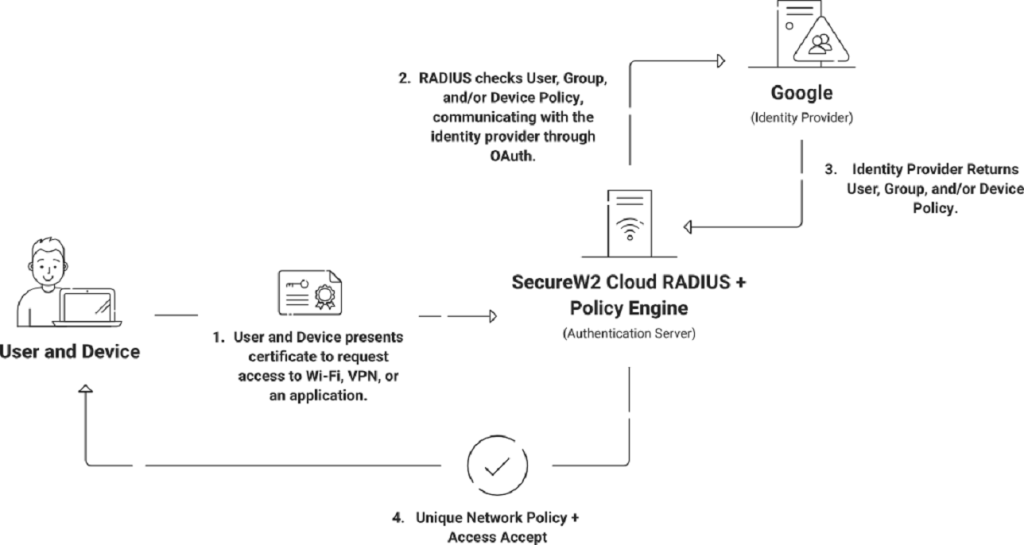
RADIUS servers serve as network security guardians standing between wireless devices requesting access and the central authentication infrastructure. They ensure only authorized devices with valid certificates can establish secure network connections.
RADIUS servers form the backbone of certificate-based authentication by facilitating seamless communication between access points and authentication servers.
Step 3: Certificate Authentication Using EAP-TLS
Once the authentication process begins, the network uses an Extensible Authentication Protocol (EAP) method to verify device identity. The most secure method used in certificate-based authentication is Extensible Authentication Protocol-Transport Layer Security (EAP-TLS).
Leveraging EAP-TLS
EAP-TLS uses a highly secure certificate-based authentication process. This process relies on something called asymmetric cryptography, which involves both public and private keys. When a client device seeks to connect to a network, it presents its digital certificate, which contains a public key, to the authentication server (usually a RADIUS server). The RADIUS server then verifies the certificate’s authenticity by examining its digital signature and ensuring that it hasn’t expired or been revoked by an approved CA.
The server generates a session-specific encryption key if the certificate successfully completes these validation tests. The encryption key is then encrypted with the client’s public key from the certificate and returned to the client. The client decrypts the key using its private key, thereby proving that it possesses the corresponding key without transmitting it. Once the verification succeeds, the client and server create a secret session encryption key for secure data transmission throughout the session.
This rigorous certificate validation and key exchange process ensures that only authenticated, authorized devices with valid certificates are granted access to the network, thereby substantially enhancing the overall security of the network.
Step 4: Mutual Authentication
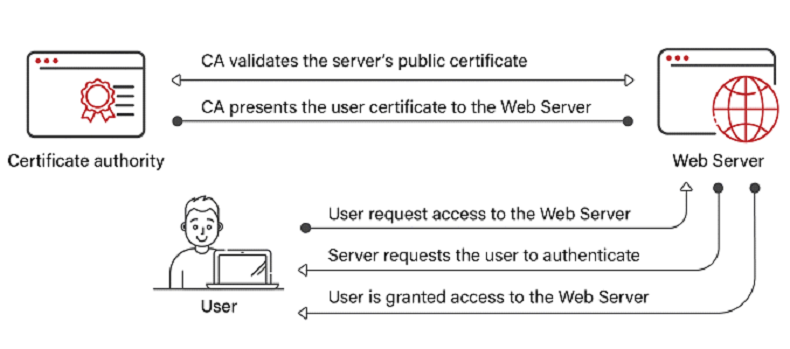
Beyond validating the client certificate, the device also verifies the RADIUS server’s certificate to confirm that it is communicating with a trusted server.
Server Certificates and Issuing CAs
In addition to validating client certificates, RADIUS servers use their own certificates to further secure the communication channel between devices and the server. This procedure ensures that the exchange of sensitive information remains encrypted and secure against eavesdropping. The RADIUS server certificate and the certificate of the issuing CA support this secure communication channel. As devices and servers engage in mutual certificate-based authentication, the network ecosystem is strengthened against potential threats.
Step 5: Secure Session Key Creation
Once authentication succeeds, the client and authentication server establish a unique session encryption key. This key encrypts all data transmitted between the device and the wireless network for the duration of the session.
Step 6: Network Access Granted
After successful authentication and key exchange, the RADIUS server notifies the access point that the device is authorized. The access point then allows the device to join the network and begin transmitting data securely.
How Devices Obtain Certificates
Mobile Device Management (MDM) solutions efficiently facilitate the transition to certificate-enabled security for corporate environments’ managed devices. This centralized approach guarantees a secure and seamless procedure. With meticulous integration between MDM systems and the organization’s chosen Certificate Authority (CA) infrastructure, certificate enrollment for managed devices is automated. This may involve trusted public CAs or private CAs, like SecureW2, ensuring a seamless certificate issuance process for managed devices. The coordination process includes generating a Certificate Signing Request (CSR) and submitting it to the CA to issue the necessary certificate.
Click here to read our blog on the Best Private CA / PKI Service.
The challenge of integrating certificates on Bring Your Own Devices (BYODs) is handled with a user-centric technique. Self-service portals act as gateways for network access for personal devices. This method allows users to initiate the certificate enrollment procedure and acquire certificates quickly.
In addition, enrollment communications contain personalized links that guide users through the registration process. This method prioritizes security without increasing its complexity. As users enroll effectively, their devices receive unique certificates, establishing a secure and trustworthy connection to the network.
JoinNow MultiOS by SecureW2 makes it easy to set up your device. Our user-friendly solution ensures error-free configuration of unmanaged devices, removing the possibility of misconfiguration. It works with all major operating systems, has guided user flows, and gives end-users the power to set up their devices easily. With JoinNow MultiOS, you can make onboarding both secure and easy.
Advantages of Wi-Fi Certificate Authentication
Transitioning from standard Wi-Fi systems that use passwords to ones that use certificates for identity requires a careful, well-planned, and well-communicated approach. But once that has happened, certificate-based Wi-Fi authentication provides many benefits that all help make the network safer and improve the user experience.

Enhanced Security
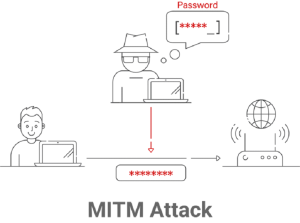
Certificates rely on public-key cryptography rather than shared secrets like passwords. Because each certificate contains a unique key pair and identity, attackers cannot easily intercept or reuse credentials.
This significantly reduces the risk of common attacks, including:
- Credential theft
- Brute-force attacks
- Phishing attempts
- Man-in-the-middle (MITM) attacks
Individual User and Device Authentication
Unlike shared Wi-Fi passwords, certificates uniquely identify each device or user. Every certificate issued is individually linked to a specific identity within the organization, eliminating security risks associated with shared credentials. This also makes it easier to track exactly which device or user accessed the network.
Granular Access Control
Certificate authentication integrates with identity providers and directory systems to support attribute-based access control. With this, admins can enforce policies based on factors like:
- User roles
- Department membership
- Device type or operating system
- Security compliance status
This granular control allows organizations to grant appropriate access levels while minimizing unnecessary exposure to sensitive systems.
Centralized Management
Certificate-based Wi-Fi authentication simplifies network administration by centralizing identity verification within the organization’s PKI and authentication infrastructure. Administrators can issue certificates automatically, revoke certificates if devices are compromised, and update access policies centrally.
Scalability for Growing Organizations
As organizations grow and add more devices, managing shared Wi-Fi passwords becomes increasingly complex. Certificate authentication scales much more effectively because certificates can be automatically issued and managed through directory integrations, Mobile Device Management (MDM) systems, and automated enrollment tools. Organizations can support thousands of devices without increasing administrative overhead.
Auditability and Accountability
With every certificate linked to a specific user or device, organizations can log and track network access events accurately. This gives better visibility into network activity and helps organizations investigate incidents, monitor usage patterns, and enforce security policies. Detailed audit logs are particularly valuable for industries with strict compliance requirements.
Compatibility with Enterprise Systems
Certificate authentication integrates with many enterprise identity systems, including cloud identity providers and directory services. Organizations can align their Wi-Fi access policies with broader identity and access management (IAM) strategies to create a more unified security framework.
Compliance with Security Standards
Many security frameworks and regulatory standards encourage or require strong authentication methods. Certificate-based Wi-Fi authentication helps organizations meet requirements for data protection, access control, identity verification, and network security monitoring.
Navigating Security and Granularity by Managing Access
Wi-Fi certificate authentication extends beyond the initial connection phase and into the specifics of access management. This section further explores the advanced techniques that enable RADIUS servers to control access precisely. This multifaceted management process ensures a robust and secure network environment through attribute-based authorization, real-time lookup, and efficient certificate revocation techniques.
Authorization Based on Attributes
Attribute-Based Access Control (ABAC) is a sophisticated access control method that surpasses traditional Role-Based Access Control (RBAC). ABAC bases access decisions on several attributes associated with users, resources, and the surrounding environment. This method enables organizations to dynamically grant or deny access based on user roles, resource types, location, time of day, and other variables.
ABAC provides a robust framework for customizing access permissions based on specific user scenarios, enhancing security and adaptability. ABAC allows administrators to construct fine-grained policies that adapt to changing attributes, facilitating enrollment and enhancing the user experience. It also provides real-time evaluation, which enables access decisions to be made dynamically, thereby enhancing security by preventing unauthorized access in specific situations, such as when users are outside the organization’s secure network.
SecureW2 Cloud RADIUS with ABAC support leverages these features to provide a robust access control solution. Referencing cloud directory attributes during authentication ensures real-time, context-based access decisions, reducing administrative burden and enhancing security in SaaS-based environments. ABAC is a flexible and granular method for regulating user access while maintaining a robust security posture.
Real-Time Lookup
Wi-Fi certificate authentication differs from traditional approaches because it can verify certificate status in real time during the authentication process. RADIUS servers perform immediate certificate validation to ensure the certificates are valid and up-to-date. This dynamic method prevents unauthorized access attempts by certificates that have been canceled or compromised. As devices join the network, RADIUS servers quickly check Certificate Revocation Lists (CRLs) or the Online Certificate Status Protocol (OCSP) to make real-time access decisions. This makes the network faster and more secure.
Robust Revocation Methods
Revocation of a certificate is an integral part of Wi-Fi certificate authentication. RADIUS servers use several methods to handle certificates that have been hacked or are no longer valid. CRLs contain a list of certificates that have been canceled. This lets RADIUS servers refuse connections from devices that use these banned certificates.
On the other hand, the OCSP checks the status of certificates in real time, so RADIUS servers can determine whether a certificate is still valid at any given time. These ways to revoke certificates keep network access safe from threats that could come from certificates that are not authorized or have been hacked.
Supporting Legacy Devices Without 802.1X Certificates
The rise of cutting-edge network security solutions is accompanied by older devices that lack interoperability with advanced protocols such as 802.1X certificates. As organizations move to a more secure system of identity based on certificates, they will eventually run into devices that don’t support this advanced protocol. These devices, often old but still needed for daily tasks, could hinder the smooth user experience that certificate identification is supposed to provide.
Network managers use a dual-network approach to deal with this problem. This requires making a second SSID, which is a separate network channel. The primary SSID uses a certificate for identification, but this secondary SSID is only for devices that can’t use certificates. Instead, these devices gain entry to the network through a password. This new way keeps old devices connected without weakening the network’s security.
MAC authentication bypass (MAB) is a similar method that can be used with dual SSID configurations. MAB lets devices connect to the network based on their MAC addresses, unique identifiers for hardware assigned to network interfaces. When 802.1X certificates can’t be used, network managers can set up MAB to identify devices based on their MAC addresses. However, MAB has drawbacks because it does not give the same level of security as certificate-based authentication, and MAC addresses may be spoofed.
Even though dual SSIDs and MAB can help organizations support legacy devices, it’s important to consider the trade-offs between security and ease when using them. Also, network managers should be on the lookout for security threats, especially when older devices with less secure login methods need to be connected.
Transforming Your Network Security Landscape With SecureW2
SecureW2 is your trusted ally in bolstering the security of your digital environment by implementing robust Wi-Fi integrations. Our state-of-the-art solutions are designed to address the security needs of both managed and unmanaged devices, providing a comprehensive approach to safeguarding your network infrastructure.
Solutions from SecureW2 like Cloud RADIUS integrate with leading cloud Identity Providers (IdPs) and authentication systems, making it easy to deploy certificate-based authentication across your organization. To learn more, contact us or schedule a demo today to explore how SecureW2 can help secure your network.
